
Clipboard manager for Mac
Coming to the Mac App Store.

How to see clipboard history on a Mac
- Copy something in any app.
- Press Shift-Command-V. Your history opens, newest first.
- Type to search, or use the arrow keys.
- Press Return to copy the item, then Command-V to paste it.
Keyboard shortcuts
| Shift-Command-V | Open the shelf |
|---|---|
| Return | Copy the selected item |
| Command-1 to 9 | Copy item 1 to 9 |
| Space | Preview the item |
| Command-E | Edit the item |
| Command-N | Type a new item |
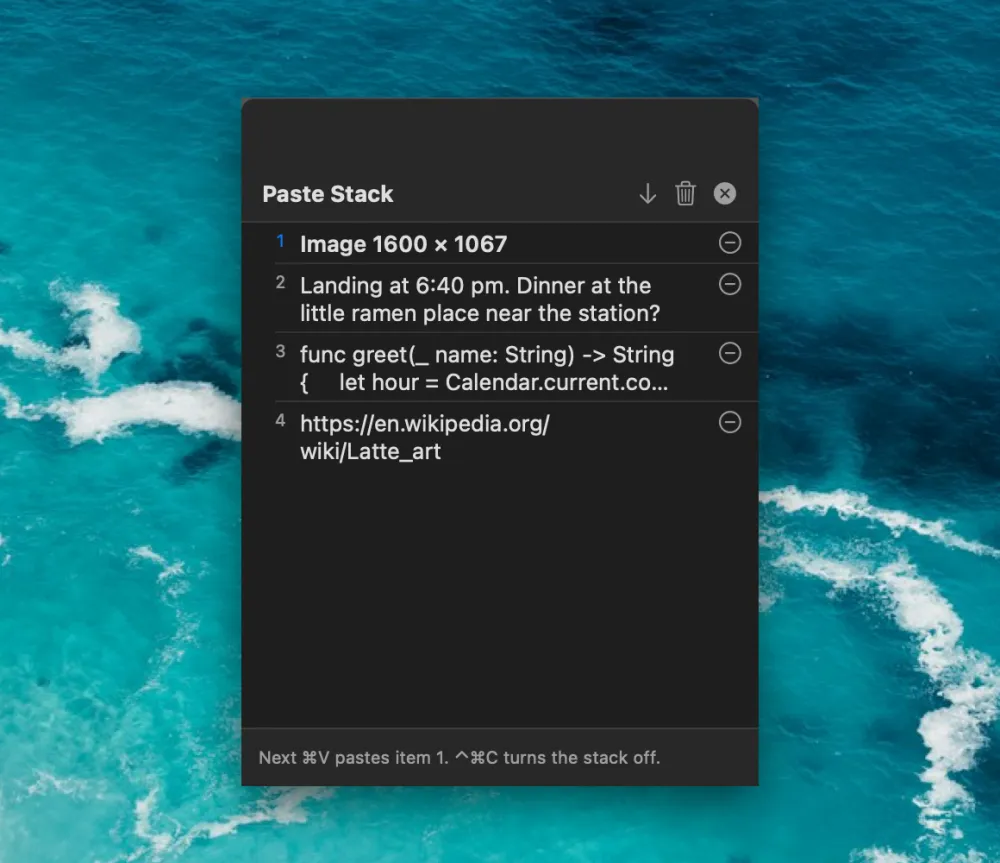
| Control-Command-C | Turn Paste Stack on or off |
Paste in order
Press Control-Command-C, copy each item, then press Command-V to paste them one by one.
Details
- Text, rich text, links, colors, images and files.
- Search text inside copied images. Recognition runs on your Mac.
- Filter by type, app and date.
- Skips confidential content, and any app you choose to ignore.
- Hidden from screen sharing unless you turn that on.
- macOS 14 or later. One-time price, no subscription.